GitHub Actions Cron Schedule:
UTC, 5-Min Limit & 3 More Gotchas
GitHub Actions makes it easy to schedule automated workflows — but it comes with a handful of sharp edges that catch almost every developer at least once. This guide covers everything from basic syntax to the 5 gotchas that explain why your scheduled workflow isn't running when you expect it to.
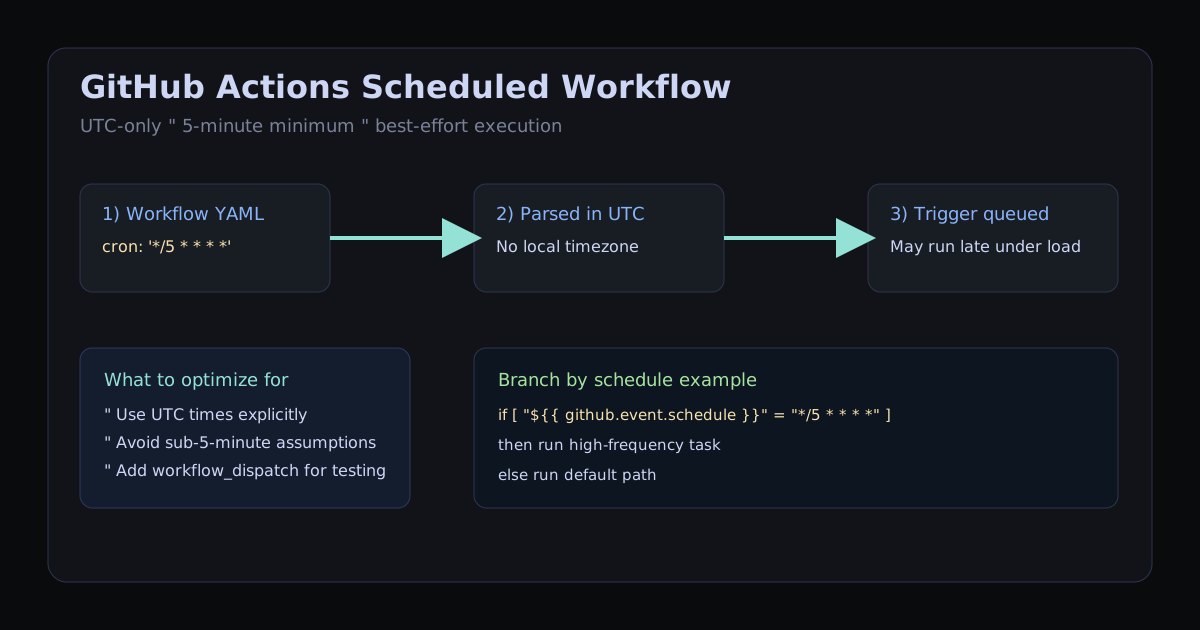
on.schedule with standard 5-field cron syntax, always evaluated in UTC. The minimum interval is 5 minutes, and runs can be delayed at busy times, so schedule important jobs away from the top of the hour.
Basic Syntax
Scheduled workflows live in your .github/workflows/ directory. The schedule trigger takes a list of cron expressions under the on: key:
# .github/workflows/scheduled-job.yml
name: Scheduled Task

on:
  schedule:
      # Runs every day at 9:00 AM UTC
    - cron: '0 9 * * *'

jobs:
  run-task:
    runs-on: ubuntu-latest
    steps:
      - uses: actions/checkout@v4
      - name: Run the task
        run: echo "Running at $(date)"
The expression must be in single quotes. GitHub Actions YAML is strict about this — unquoted cron expressions with * can cause YAML parse errors on some parsers.
GitHub Scheduler Docs Essentials
If you searched for "GitHub scheduler" or "GitHub Actions schedule cron documentation", this is the exact behavior you need to remember: scheduled workflows use the on.schedule trigger with cron syntax, always in UTC, and GitHub may delay execution during peak load.
# Minimal docs-style schedule trigger
on:
  schedule:
    - cron: '*/5 * * * *'
You can detect which schedule fired your workflow using github.event.schedule, which is useful when one workflow has multiple cron entries:
steps:
  - name: Branch logic by schedule
    run: |
      if [ "${{ github.event.schedule }}" = "*/5 * * * *" ]; then
        echo "High-frequency task"
      else
        echo "Default schedule path"
      fi
Need to verify syntax first? Use Cron expression examples for copy-paste patterns, then validate exact next run times in the CronBuilder tool.
Ready-to-Use Expressions for GitHub Actions
All times are UTC. Use the CronBuilder timezone selector to find your UTC equivalent if you're scheduling for a specific local time.
| Expression | Schedule | UTC time |
|---|---|---|
'0 0 * * *' | Daily at midnight UTC | 00:00 UTC |
'0 9 * * *' | Daily at 9am UTC | 09:00 UTC |
'0 9 * * 1-5' | Weekdays at 9am UTC | Mon–Fri 09:00 UTC |
'0 6 * * 1' | Every Monday at 6am UTC | Mon 06:00 UTC |
'0 0 1 * *' | 1st of every month, midnight UTC | 1st 00:00 UTC |
'*/5 * * * *' | Every 5 minutes (minimum allowed) | :00 :05 :10... |
'*/15 * * * *' | Every 15 minutes | :00 :15 :30 :45 |
'0 */6 * * *' | Every 6 hours | 00:00 06:00 12:00 18:00 |
'30 8 * * 1-5' | Weekdays at 8:30am UTC (= 9:30 BST) | Mon–Fri 08:30 UTC |
⚠ Gotcha 1: GitHub Actions Cron Is UTC Only
Unlike Linux cron (which respects the server timezone and supports CRON_TZ), GitHub Actions has no timezone configuration for schedule triggers. The cron: value is always interpreted as UTC.
If you want a job to run at 9am London time, remember London is UTC+0 in winter and UTC+1 in summer (BST). That means '0 9 * * *' in winter and '0 8 * * *' in summer — or accept that local wall-clock time drifts by an hour during DST changes.
Workaround: Handle timezone in the workflow step
steps:
  - name: Run only if it's 9am in London
    run: |
            # Check current London time inside the step
      LONDON_HOUR=$(TZ='Europe/London' date +%H)
      if [ "$LONDON_HOUR" -eq 9 ]; then
        echo "Running at 9am London"
        ./run-task.sh
      fi
This is inelegant but it's the most DST-safe approach if local time matters to you.
⚠ Gotcha 2: The 5-Minute Minimum
GitHub enforces a minimum interval of 5 minutes on scheduled workflows. An expression like * * * * * (every minute) or */2 * * * * (every 2 minutes) will not trigger more frequently — GitHub will simply not run it at the expected cadence, sometimes skipping runs entirely.
# ❌ This will NOT run every minute as expected
- cron: '* * * * *'

# ❌ This will NOT run every 2 minutes as expected
- cron: '*/2 * * * *'

# ✅ This is the minimum that reliably works
- cron: '*/5 * * * *'
If you need sub-5-minute scheduling, use an external service or trigger the workflow via the GitHub API from your own infrastructure.
⚠ Gotcha 3: Scheduled Runs Are Delayed
GitHub's documentation explicitly states that scheduled workflows may be delayed during periods of high load on GitHub's infrastructure. In practice, delays of 5 to 30 minutes are common at peak hours (especially around :00 and :30 past the hour when everyone's jobs are set to run).
This means GitHub Actions cron is not appropriate for time-sensitive tasks. If your job must fire within 60 seconds of the scheduled time, use a dedicated cron service (Linux cron, AWS EventBridge, Google Cloud Scheduler) and trigger the workflow via the GitHub API.
Triggering a workflow via API (reliable alternative)
# Add workflow_dispatch to your workflow file
on:
  schedule:
    - cron: '0 9 * * 1-5'
  workflow_dispatch:  # Allows manual + API triggering

# Then trigger it precisely from your own cron server
curl -X POST \
  -H "Authorization: Bearer $GITHUB_TOKEN" \
  -H "Accept: application/vnd.github+json" \
  https://api.github.com/repos/OWNER/REPO/actions/workflows/WORKFLOW_ID/dispatches \
  -d '{"ref":"main"}'
⚠ Gotcha 4: Inactive Repos Get Their Schedules Disabled
If a repository has had no commits, pull requests, or other activity for 60 days, GitHub will automatically disable its scheduled workflows. You'll receive an email notification, but if you miss it, your jobs simply stop running with no other warning.
To re-enable them, go to the Actions tab in your repository and click "Enable" on the disabled workflow.
Workaround: Keep the repo active
# Add this step to your scheduled workflow to create a commit
# that keeps the repo active
steps:
  - uses: actions/checkout@v4
  - name: Keep repo active
    run: |
      git config user.email "action@github.com"
      git config user.name "GitHub Action"
      git commit --allow-empty -m "chore: scheduled run $(date -u)"
      git push
⚠ Gotcha 5: Day-of-Month + Day-of-Week Is OR, Not AND
This is a standard cron behaviour that surprises people in every context, but it's especially painful in GitHub Actions because you can't easily test it. If you specify a non-wildcard value for both day-of-month and day-of-week, the job fires when either condition is true.
# ❌ Intended: "the first Friday of every month"
# ✅ Actual: "the 1st of every month" OR "every Friday"
- cron: '0 9 1 * 5'

# ✅ To get "first Friday of the month", check inside the workflow step
Correct approach for "first Friday of the month"
on:
  schedule:
        # Run every Friday at 9am UTC
    - cron: '0 9 * * 5'

jobs:
  first-friday-only:
    runs-on: ubuntu-latest
    steps:
      - name: Check if first Friday
        run: |
                    # Only proceed if the day of month is 1-7 (first week)
          DAY=$(date +%d)
          if [ "$DAY" -gt 7 ]; then
            echo "Not the first Friday — skipping"
            exit 0
          fi
          echo "First Friday confirmed — running task"
          ./monthly-task.sh
How to Test Your Schedule Before Pushing
Waiting for a cron job to fire to see if it works is painful. Here are three ways to test immediately:
Method 1: Add workflow_dispatch and trigger manually
on:
  schedule:
    - cron: '0 9 * * 1-5'
  workflow_dispatch:  # ← add this line
Now you can trigger the workflow manually from the Actions tab while you iterate, then remove workflow_dispatch when you're happy.
Method 2: Temporarily set to */5 to verify it fires at all
# Set to every 5 minutes temporarily to confirm the workflow runs
- cron: '*/5 * * * *'

# Once confirmed, set it to your real schedule
- cron: '0 9 * * 1-5'
Method 3: Validate the expression before pushing
Paste your expression into CronBuilder.dev to see the next 10 UTC run times before you push. The expression 0 9 * * 1-5 is easy to confuse with 0 9 * * 1,5 (which runs on Mondays AND Fridays only, not every weekday).
Running Multiple Schedules on One Workflow
You can attach more than one cron expression to a single workflow. GitHub Actions will trigger the workflow on any matching schedule:
on:
  schedule:
        # Hourly during UK business hours on weekdays
    - cron: '0 8-17 * * 1-5'
        # Once overnight for cleanup
    - cron: '0 2 * * *'
If you need to behave differently depending on which schedule triggered the run, use the github.event.schedule context:
steps:
  - name: Check which schedule triggered this
    run: |
      if [ "${{ github.event.schedule }}" == "0 2 * * *" ]; then
        echo "Running overnight cleanup"
        ./cleanup.sh
      else
        echo "Running hourly sync"
        ./sync.sh
      fi
Build your schedule expression
Use CronBuilder.dev to construct your cron expression, preview the next 10 UTC run times, and copy it directly in GitHub Actions format — with the single quotes already included.
Build My Expression →Related: Cron job not running? — 10 reasons and how to fix. Cron vs systemd timers — when to use each on Linux. Every 5 minutes cron and weekdays at 9am cron are both common GitHub Actions schedules.